How to Break Up with Your Agent
The biggest shift in developer tooling over the last year wasn't the rise of agents. It was the rise of agent subscriptions. We stopped choosing LLM platforms and counting tokens. We started choosing an agent CLI and paying a flat monthly fee.
That works until you realize each agent implies a specific frontend. Cursor is its own editor (a VS Code fork). Claude Code started as a terminal-only tool. Many agents only work well inside one specific environment. Even agents with broad IDE support, like Copilot, tie deeper features to their own ecosystem. If you want a different agent in your favorite editor, you're often out of luck.
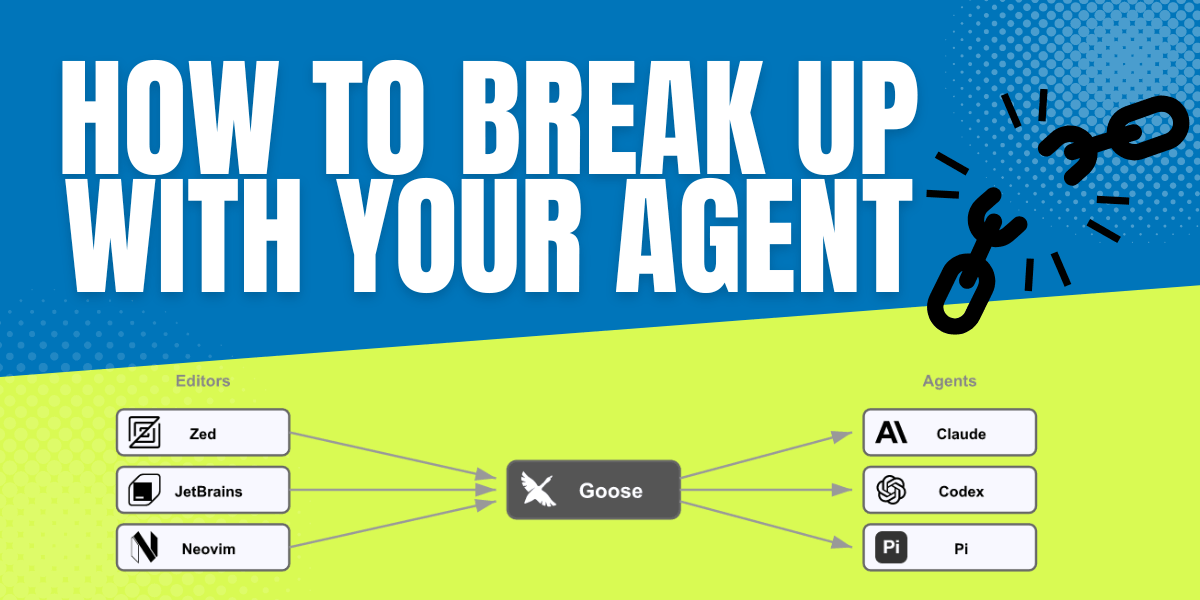
Agent Client Protocol (ACP) is a community specification led by Zed Industries that decouples agents from editors. Goose implements ACP in both directions: editors can plug into goose, and goose can plug into other agents. This post walks through what that looks like in practice today.
The Integration Problem
Dozens of agents exist. Dozens of editors exist. Each combination requires a custom integration that has to track both sides as they ship updates. Goose learned this the hard way. Multiple community maintainers built VS Code extensions and even an IntelliJ plugin, but none could keep pace with goose's release cadence. Every goose change meant updating every plugin, and the plugins fell behind.
ACP sidesteps this. Like MCP, ACP defines a JSON-RPC protocol over stdio, but for agent-editor communication. Editors implement the client interface while agents implement the server. Capabilities like model selection, slash commands, file I/O, and terminal execution are in the ACP protocol, eliminating custom code per agent.
Use Any Editor with Goose
Goose is listed in the ACP Agent Registry, so Zed and JetBrains can discover and install it automatically. For editors that don't read the registry yet, like Neovim with avante.nvim, the config is straightforward:
acp_providers = {
  ["goose"] = {
    command = "goose",
    args = { "acp", "--with-builtin", "developer" },
  },
},
What flows through ACP goes beyond prompts. Editors can delegate file reads (including files you haven't saved yet), run terminal commands, and present permission dialogs natively. Any MCP servers configured in your editor are automatically added as extensions for that goose session, so you don't have to configure them in two places.
See the ACP clients guide for more.
Use Any Agent with Goose
Goose also speaks ACP as a client. It can orchestrate other agents as ACP providers. You keep goose's UI and extensions, but the underlying LLM and MCP calls go through the other agent. Today that includes Claude Code, Codex, Copilot, Gemini, Amp, and Pi.
Some agents like Gemini and Copilot speak ACP natively. Others like Claude need a small adapter installed first:
npm install -g @agentclientprotocol/claude-agent-acp  # one-time adapter install
GOOSE_PROVIDER=claude-acp GOOSE_MODEL=current goose
Setting the model to current means "use whatever model is configured in the underlying agent."
See the ACP providers guide for the full list and setup instructions.
Where ACP Stops Today
ACP is pre-1.0. Some things work well, some don't yet:
- Permission dialog rendering varies by editor. What looks native in Zed may render differently in Neovim.
- Not every agent honors MCP server configs passed by the client. Coverage depends on the agent.
- Model and mode switching support varies. Some agents expose a full model list, others expose aliases.
- The protocol is still stabilizing. Features move between stability tiers as implementations mature.
These are real edges. The protocol is young. The direction is right.
Where to Next
Goose currently has separate code paths for its desktop app, CLI, and ACP server. That's converging. The goose daemon is transitioning to ACP as its protocol, so every frontend becomes a thin ACP client talking to the same backend. Provider selection and config changes happen over ACP custom requests instead of per-frontend logic.
On the provider side, adding a new ACP agent to goose today means writing a Rust file. Declarative ACP providers would replace those files with JSON configs, making it possible to add agents without recompiling goose. Combined with native support for the ACP Agent Registry, goose could discover and offer new agents as they appear in the registry, no release required.
Try It
Goose was recently donated to the Agentic AI Foundation (AAIF) inside the Linux Foundation. Interoperability is the thesis: goose shouldn't lock you into one agent or one editor.
I'm walking through this architecture at AI Native DevCon, where every slide links to the PR or GitHub discussion behind it.
Pick the UI you like. Pick the agent you like. They don't have to be the same thing.